


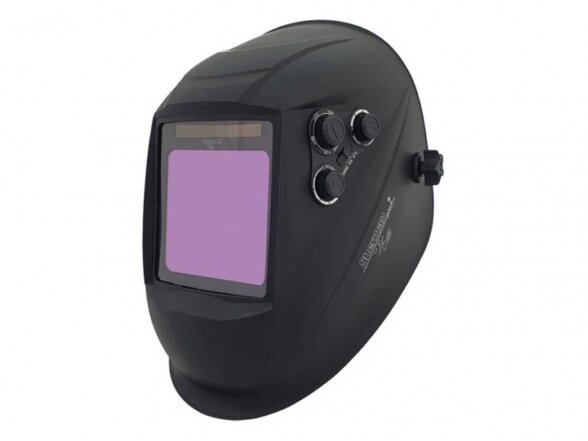

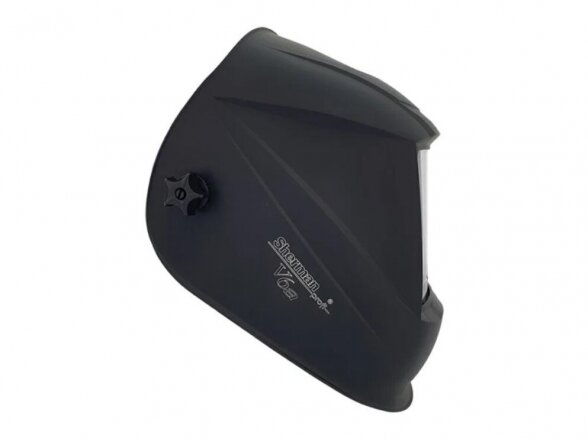



Sherman-profi V6a welding helmet
Code: 7812649Manufacturer-
Darkening range
DIN 5 - 13
Reaction time
1/30000 s
Delay (for lightening)
0.2 – 0.8 s
Sensitivity adjustment
continuous
Welding/Grinding
yes/yes
Number of arc sensors
4
Viewing area
100 x 97 mm
UV/IR protection
DIN 16
Light state
DIN 4
Standards for eye protection
1/2/1/2
Power supply
solar cell
Switching On/Off
automatic
Operating temperature range
-5 to +55°C
Weight
0.55 kg
The automatic welding helmet Sherman-profi V6a is designed to protect the welder's eyes and face from sparks, welding spatter and harmful radiation during welding, soldering and grinding. The automatic filter shifts from light to dark when the arc is ignited, and returns to light after welding is finished. The use of TRUE COLOR full color mapping technology ensures a high level of work comfort.
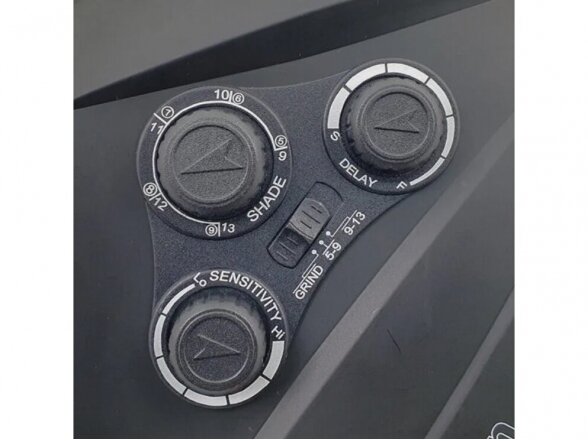
This welding helmet has three external knobs that allow for the adjustment of the shade level from 5 to 13 according to DIN, smooth adjustment of sensor sensitivity to the arc intensity during welding, and control of the dark/light state transition delay time. A grinding mode is also available, where the filter switches to light state without the ability to adjust the shade.
Four arc sensors ensure accurate helmet function under all conditions and in all positions, which is particularly important when welding with low currents. The helmet has an exceptionally large viewing area of 100 x 97 mm. An advanced and ergonomic system that allows adjustment on any head shape, fully adjustable helmet position. A special tilt system shifts the weight of the helmet in relation to the welder's head.
On the inner control panel, there is a "Test" button that allows checking if the filter is functioning properly. The Sherman-profi V6a helmet provides complete protection for the eyes and face from ultraviolet and infrared radiation. The UV/IR protection level is 16 (DIN), even when the filter is in its light state. The helmet is ready for use immediately, just need to adapt it to the welder's head shape and select and set the appropriate operating parameters.
-
- Welding Equipment
- Laser levels, detectors
-
Power tools
-
- Battery chargers + jump starters
- Lighting equipment
- Cordless Tools
- Angle grinders
- Straight grinders and their accessories
- Concrete and plaster grinders
- Stone grinders and polishers
- Tile laying and stone working tools
- Wall and ceiling sanders
- Tube grinders
- Seam grinders
- Metal polishers and grinders
- Polishers
- Airless paint sprayers
- Paint sprayer nozzles
- Metal cutting machines
- Metal lathes
- Gas-powered fastening tools
- otary hammers & demolition hammers
- Diamond drilling machines
- Mixers
- Internal concrete vibrators
- Drill presses
- Magnetic drill presses
- Drill bits
- Screwdrivers
- Electric impact wrenches
- Tin snips
- Multifunctional tools
- Sanders
- Sandpapers and sharpening stones
- Drill bit sharpeners
- Belt sanding machines
- Electric chainsaws
- Circular saws and their accessories
- Cutting disc sharpeners
- Wall chasers
- Stone cutting circular saws
- Cleaning machines
- Milling machines
- Milling machines
- Lamella cutters
- Hand planes
- Grinding machines
- Wood cutting machines
- Combination woodworking machines
- Angle cutting machines
- Stationary band saws
- Metal cutting band saw machines
- Narrow saw blades and cutting blades
- Reciprocating saws
- Wood lathe
- Animal clippers
- Tools for working with insulation materials
- Plastic pipe welding machines
- Pipe and duct cleaning
-
-
Tool accessories
-
- Markers
- Cutting discs
- Blades for blocks
- Blades for linear saws
- Flap abrasive discs
- Blades for narrow saws
- Abrasive discs
- Abrasive rollers
- Abrasive belts
- Cutters for metal
- Polishing pastes
- Polishing pads
- Band saw blades for metal
- Weldon shanks
- Drills and core bits for tiles and engineered stone
- Tile and engineered stone milling cutters
- HSS Bi-Metal drill bits
- HSS Bi-Metal drill bit sets
- Bi-Metal core bit accessories
- Rosette diamond core bits and accessories
- Segments
- Diamond abrasive discs
- Concrete chisels SDS-Plus / SDS-MAX
- Mixing attachments
- Other accessories for mixers
- SDS Plus drill bits
- Drill bits for concrete and stone
-
-
Hand tools
-
- Clamps
- Auto repair equipment
- Measuring tapes
- Hammers & mallets
- Crowbar
- Wood chisels
- Tin snips
- High-performance shears with HSS blades
- Jeweler’s shears
- Torque wrenches
- Ratchet wrenches + socket handles
- Crimping pliers
- Terminal crimping pliers
- Wire cutting scissors + pliers
- Cable cutters
- Wire stripping tools
- Knives for wires
- Combination scissors
- Wire cutters
- Sheet metal forming machines
- Strip steel cutting shears
- Household scissors
- Guillotine and shears for sheet metal
- Hydraulic punching presses
- Metal stretching and shrinking tools
- Metal pipe drilling accessories
- Paving stone cutters
- Anvil
- Machine vises
- Vise jaw protectors
- Drywall lifts
- Scaffolding stilts
- Sheet metal bending machines
- Pipe bending machines
- Screwdrivers
- Presses
- Pullers
- Grease guns
- Gaskets, seals, and other small parts
- Creepers
- Jumper cables
- Markers
- Bits and their sets
- Personal protective equipment
- Sockets and socket sets
- Socket and tool sets
- Hex bit sets
- Filling tools
- Tools for cutting metal pipes
- Tools for cutting plastic pipes
- Threading tools
- Deburring tools
- Caulking guns / Foam guns
- Workshop furniture and tool trolleys
- Mechanical caulking guns
- Mechanical nail guns/hammers
- Riveters
- Magnetic tool holders
- Magnetic stands
- Measuring instruments
- Knives
- Wrenches and sets
- Manual pressure testing pumps
- Locking pliers
-
-
Garden tools
-
- Engine Oils for Gas Tools
- Gasoline-Powered Earth Augers and Accessories
- Lawnmowers
- Lawn mowers, lawn robots
- Trimmers
- Lawn mower / trimmer accessories
- Aerators and Scarifiers
- Garden Cultivators
- Garden sprayers
- Walk-Behind Tractors
- Cultivator and motoblock accessories
- Tall grass cutting equipment
- Mini tractors
- Chainsaws
-
-
Pneumatic tools, compressors
-
- 230 V compressors (single-phase)
- 400 V compressors (three-phase)
- 12V car compressors
- Compressor parts
- Hoses
- Painting equipment
- Pneumatic impact wrenches
- Pneumatic hammers
- Pneumatic engravers
- Pneumatic angle grinders
- Pneumatic polishers
- Pneumatic grinders
- Orbital sander
- Pneumatic orbital sanders
- Pneumatic drills
- Pneumatic tool oils
- Air filters
- Screw-on air filters
- Air filter parts
- Quick couplings
- Cleaning tools
-
- Sandblasting equipment
Products catalog
-
Welding Equipment
- Welding machines
-
Welding machine and torch parts
-
Mig/Mag Welder parts
- M6 copper contact tips
- M8 copper contact tips
- Gas injectors / Nozzles
- Gas diffusers
- Ground clamps
- Gas valves
- Welding pliers
- Aerosols and pastes
- Surface Defect Detection Tools
- MIG torch liners
- Welding ground clamps
- Magnetic ground clamps
- Switchable welding magnets
- Welding magnets without switch
- Magnetic clamps
- Welding mirrors
- Semi-automatic torch heads
- Spool gun torches
- Type 14 and 15 semi-automatic welding torches
- Type 24 semi-automatic welding torches
- Class 25 semi-automatic welding torches
- Class 501 semi-automatic torches
- Class 501 semi-automatic welding torches
- TIG Welder parts
-
TIG Welder parts
- Other TIG Welding Accessories
- TIG Torch Component Kits
- TIG Pedals and Control Panels
- TIG Accessories: Diffusers, Insulators, Collets, Caps
- TIG LIFT Torches
- TIG Torches with Control Buttons
- TIG Ceramics and PYREX Glasses
- TIG Torch Head and Neck Components
- Control connectors for equipment
- Gas quick connectors
- Welding Cleaners
- Surface Defect Detection Tools
-
Plasma cutting machine parts
- Trafimet torches and accessories – A81 / A101 / A141 / SP81 / SP101 / SP141
- WTL and Hypertherm torches and their accessories TH-125 / TM-125 SP45MY / SP85MY / SP125MY POWERMAX 65 / 85 / 105 / 1000-1650HRT/MRT®
-
Spartus torches and their accessories – SP45 / SP80 / SP100 / SP120 and others
- Spartus SP45MY / SP85MY / SP125MY, WTL TH-125 / TM-125, POWERMAX 65 / 85 / 105 / 1000–1650HRT/MRT®
- Spartus SP45H / Trafimet S45
- Spartus SP80H SP80M / PT-80
- Spartus SP100H SP100M / PT-100
- SP120H / SP120M
- SP50H / SP50M
- SP70H / SP70M
- SP150H / SP150M
- SP81H / SP81M
- SP101H / SP101M
- SP141H / SP141M
- SP1250H / SP1250M / SP1650H / SP1650M
- Binzel torches and their accessories Abiplas CUT 200W / 110 / 70 / PSB 31KK
- Cebora torches and their accessories CP-161 / CP-162 / CP-450 / CP-251G and others
- Esab torches and their accessories SL60/100 / PT-31, PT-23/27
- EWS / Lincoln torches and their accessories EX100 / T120 / T100 / LC105 / FlexCut 125
- PT torches and their accessories PT100 / PT80 / PT60 / PT40 / PT20
- Sherman IPXM102 EURO burners and accessories
- Panasonic torches and their accessories P80
- Ajan HP260A torch parts
- Kjellberg torches and their accessories PerCut 160 / 170 / 100
- OTC torches and their accessories D12000
- UniTorch torches and their accessories EL120H / EL120H-HY / EL120M / EL120M-HY
- Sockets and plugs for plasma cutters
- Other accessories for plasma cutting
-
Welding cables + torches
- Ground cables
- Electrode holders
- Spool Gun torches
- Type 14 and 15 semi-automatic welding torches
- Type 24 semi-automatic welding torches
- Class 25 semi-automatic welding torches
- Type 36 semi-automatic welding torches
- Class 501 semi-automatic welding torches
- Plasma torches
- Welding plugs and sockets
- Welding power cables
- Wire feeding mechanisms
- Control connectors for equipment
- Studs
-
Mig/Mag Welder parts
-
Welding safety equipment and gear
-
Welding helmets
- Automatic welding helmets
- Welding helmets with hard hat
- Powered air-purifying welding helmet
- Flip-up welding helmets
- Welding helmet glasses and parts
- Welding under-helmets and caps
- Respirators
- Laser welding shields
- Welding helmets with passive filter
- Safety shields and glasses for grinding and plasma cutting
- Welding goggles with auto-darkening filter
- Fume extraction equipment
- Personal protection equipment
-
Welding helmets
- Welding materials
- Gas equipment
-
Welding tables and parts
-
Welding tables
- Budget welding tables
- Professional welding tables
- Welding tables for stainless steel
- Welding tables with lifting mechanism
- Rotary welding tables / positioners
- Welding supports
- Modular welding tables
- Smoke extraction equipment
- Accessories for welding tables
- Welding table accessory kits
- Welding table clamps
- Welding table accessories
- Welding table accessory sets
- Welding table clamps
-
Welding tables
- Welding accessories
- Cutting and processing equipment
- Laser levels, detectors
-
Power tools
- Battery chargers + jump starters
- Lighting equipment
-
Cordless Tools
- Cordless drills/drivers
- Cordless impact drivers
- Cordless impact wrenches
- Cordless tool kits
- Accessories for cordless screwdrivers
- Cordless angle grinders
- Cordless rotary hammers
- Cordless riveters
- Batteries and chargers
- Rebar ties
- Rebar cutting tools
- Cordless staple guns
- Battery-powered sprayers
- Cordless garden tools
- Other cordless tools
- Angle grinders
- Straight grinders and their accessories
- Concrete and plaster grinders
- Stone grinders and polishers
- Tile laying and stone working tools
- Wall and ceiling sanders
- Tube grinders
- Seam grinders
- Metal polishers and grinders
- Polishers
- Airless paint sprayers
- Paint sprayer nozzles
- Metal cutting machines
- Metal lathes
- Gas-powered fastening tools
- otary hammers & demolition hammers
-
Diamond drilling machines
- Diamond core drill bits with M16/M18 thread
- Diamond core bits with M16/M18
- Diamond core bits with R1/2" connection
- Core bits with R1/2" thread
- Diamond core drill bits with 1 1/4" UNC thread
- Diamond core bits – 1 1/4" UNC
- Diamond core drill bits with M12 thread
- Diamond core bits – M12
- Diamond core bits – M14
- Stands
- Accessories for diamond drilling
- Water containers
- Mixers
- Internal concrete vibrators
- Drill presses
- Magnetic drill presses
- Drill bits
- Screwdrivers
- Electric impact wrenches
- Tin snips
- Multifunctional tools
- Sanders
- Sandpapers and sharpening stones
- Drill bit sharpeners
- Belt sanding machines
- Electric chainsaws
- Circular saws and their accessories
- Cutting disc sharpeners
- Wall chasers
- Stone cutting circular saws
- Cleaning machines
- Milling machines
- Milling machines
- Lamella cutters
- Hand planes
- Grinding machines
- Wood cutting machines
- Combination woodworking machines
- Angle cutting machines
- Stationary band saws
- Metal cutting band saw machines
- Narrow saw blades and cutting blades
- Reciprocating saws
- Wood lathe
- Animal clippers
- Tools for working with insulation materials
- Plastic pipe welding machines
- Pipe and duct cleaning
- Blowers
- Plastic welding stations
- Soldering tools
- Ultrasonic cleaners
- Electric staple guns
- Glue guns
- Mini tools
- Oil and fuel pumps
- Lifting and pulling equipment
- Voltage converters
- Wash basins
- Extension cords
-
Tool accessories
- Markers
- Cutting discs
- Blades for blocks
- Blades for linear saws
- Flap abrasive discs
- Blades for narrow saws
- Abrasive discs
- Abrasive rollers
- Abrasive belts
- Cutters for metal
- Polishing pastes
- Polishing pads
- Band saw blades for metal
- Weldon shanks
- Drills and core bits for tiles and engineered stone
- Tile and engineered stone milling cutters
- HSS Bi-Metal drill bits
- HSS Bi-Metal drill bit sets
- Bi-Metal core bit accessories
- Rosette diamond core bits and accessories
- Segments
- Diamond abrasive discs
- Concrete chisels SDS-Plus / SDS-MAX
- Mixing attachments
- Other accessories for mixers
- SDS Plus drill bits
- Drill bits for concrete and stone
- Drill bits for metal
- Drill bits for wood
- HM hole saws for stainless steel
- Accessories for HM hole saws
- Step drill bits and sets
- Step drill bits and sets
- Punches (stamps)
- Turning tools
- Hooks
- Adapters
- Magnetic bits – heads
- Threading accessories
- Guards for angle grinders
- Stands for angle grinders
- Tile cutting accessories
- Drilling dust extraction adapters
- Other accessories
-
Hand tools
-
Clamps
- Cast iron clamps
- Clamps made from solid metal profile
- Lever clamps
- High-pressure clamps
- Kombi Klamp clamps
- U-shaped clamps
- Clamps for hard-to-reach areas
- Clamps adaptable to various shapes
- C-clamps
- Edge clamps
- Workbench clamps
- Lever locks
- Frame clamps
- One-handed clamps
- Rafter and beam clamps
- Lightweight clamps
- Spring clamps
- Band clamps
- Corner clamps
- Panel alignment tools
- Door, window, and frame clamps
- Pipe clamps
- Special tools for flooring installation
- Mounting supports
- Clamps accessories
-
Auto repair equipment
- Oxygen sensor tips
- Support(s)
- Auto body repair and maintenance
- Diagnostic equipment and tools
- Filter wrenches
- Auto glass replacement tools
- Lifts and scissor lifts
- Car and motorcycle lifts
- Tire inflators and pressure gauges
- Air conditioner refilling
- Pry bars and levers for tire mounting
- Auto repair accessories
- Wheel wrenches
- Engine hoists, stands, and cranes
- Hand tools for auto repair
- Tube bending and rolling kits
- Spark plug wrenches
- Oil drain and fill tanks, collection containers, and tools for oil change
- Automotive trim removal tools
- Fuel injector tools
- Measuring tapes
-
Hammers & mallets
- Soft-Face Mallets with Changeable Inserts
- Non-inertial non-rebound (Dead-Blow) hammers
- Machinist hammers
- Welding (Chipping) Hammers
- Claw & Carpenter’s Hammers
- Sledgehammers
- Splitting Axes & Mauls
- Punches / Drifts
- Hammer accessories
- Roofing/Latthammer, Masons', Tilers' Hatchet, Pavers', Sheeting
- Hammer & Mallet Sets
- Crowbar
- Wood chisels
- Tin snips
- High-performance shears with HSS blades
- Jeweler’s shears
- Torque wrenches
- Ratchet wrenches + socket handles
- Crimping pliers
- Terminal crimping pliers
- Wire cutting scissors + pliers
- Cable cutters
- Wire stripping tools
- Knives for wires
- Combination scissors
- Wire cutters
- Sheet metal forming machines
- Strip steel cutting shears
- Household scissors
- Guillotine and shears for sheet metal
- Hydraulic punching presses
- Metal stretching and shrinking tools
- Metal pipe drilling accessories
- Paving stone cutters
- Anvil
- Machine vises
- Vise jaw protectors
- Drywall lifts
- Scaffolding stilts
- Sheet metal bending machines
- Pipe bending machines
- Screwdrivers
- Presses
- Pullers
- Grease guns
- Gaskets, seals, and other small parts
- Creepers
- Jumper cables
- Markers
- Bits and their sets
- Personal protective equipment
-
Sockets and socket sets
- 1/4'' socket sets
- 3/8'' socket sets
- 1/2'' socket sets
- Combination socket sets
- Impact socket sets
- Impact thin-wall socket sets
- 1/4'' sockets
- 3/8'' sockets
- 12-point sockets
- Inch sockets
- E-type sockets
- Hex sockets
- Super Lock sockets
- Impact thin-wall sockets
- Impact sockets
- Socket extensions
- Socket accessories
- Impact adapters
- Socket and tool sets
- Hex bit sets
- Filling tools
- Tools for cutting metal pipes
- Tools for cutting plastic pipes
- Threading tools
- Deburring tools
- Caulking guns / Foam guns
- Workshop furniture and tool trolleys
- Mechanical caulking guns
- Mechanical nail guns/hammers
- Riveters
- Magnetic tool holders
- Magnetic stands
- Measuring instruments
- Knives
- Wrenches and sets
- Manual pressure testing pumps
- Locking pliers
- Pliers
- Profile crimping pliers
- Plumbing wrenches+ Pliers
- Sheet Metal and Roofing Tools
- Brushes
- Rebar tiers
- Hand pumps
- Vacuum lifters and holders
- Measuring tools, templates, and stencils
- Ladders
- Construction Props
- Tarpaulins
- Grinding and Sanding Tools
-
Clamps
-
Garden tools
- Engine Oils for Gas Tools
- Gasoline-Powered Earth Augers and Accessories
- Lawnmowers
- Lawn mowers, lawn robots
- Trimmers
- Lawn mower / trimmer accessories
- Aerators and Scarifiers
- Garden Cultivators
- Garden sprayers
- Walk-Behind Tractors
- Cultivator and motoblock accessories
- Tall grass cutting equipment
- Mini tractors
- Chainsaws
- Chainsaw Chain Sharpeners
- Brushcutters
- Water Pumps
- Petrol-Powered Earth Augers
- Log splitters
- Petrol-Powered Soil Compactors
- Leaf blowers
- Wood chippers
- Power Generators
- Engines
- Pressure washers
- Garden sheds
- Garden carts
- Heating equipment
- Garden pruners and pruning tools
- Sweeping machines, brooms, and washers
- Motorized garden carts
- Portable power stations
- Other garden tools
-
Pneumatic tools, compressors
- 230 V compressors (single-phase)
- 400 V compressors (three-phase)
- 12V car compressors
- Compressor parts
- Hoses
- Painting equipment
- Pneumatic impact wrenches
- Pneumatic hammers
- Pneumatic engravers
- Pneumatic angle grinders
- Pneumatic polishers
- Pneumatic grinders
- Orbital sander
- Pneumatic orbital sanders
- Pneumatic drills
- Pneumatic tool oils
- Air filters
- Screw-on air filters
- Air filter parts
- Quick couplings
- Cleaning tools
- Oil/grease tanks
- Tire inflators and pressure gauges
- Anti-corrosion spray guns
- Pneumatic caulking guns
- Pneumatic riveters
- Pneumatic hammers
- Pneumatic spot weld grinders
- Blow guns
- Other pneumatic tools
- Sinks
- Sandblasting equipment


Get in touch
+370 677 71883
Verskis.lt demo shop
© 2026 UAB Eleoras. Without UAB Eleoras confirmation any use or copying of site content is prohibited.
Sherman-profi V6a welding helmet
Add to cart -